Results 1 to 20 of 179

Thread: wwWidgets

Hybrid View

Previous Post Previous Post   Next Post Next Post
  1. #1
    Join Date
    Nov 2006
    Location
    Shrewsbury, UK
    Posts
    97
    Qt products
    Qt4
    Platforms
    Windows
    Thanks
    3
    Thanked 11 Times in 11 Posts

    Default Re: wwWidgets

    wysota,

    I know you said not to to comment about "unstable" widgets, but I had some minor success yesterday hacking the qwwnavigationbar component into some sort of stability. I've got the primary functionality working with the PushButtons activating the correct QWidget in the top half of the splitter and have sucessfully "styled" the PushButtons to the original "Outlook" (silver version) look similar to my screen grab above but without the minimize bar. The question is if you want the code fed back - I've changed both the header (replacing the topButton with a QLabel) and cpp and have added pngs to the resource file. Any interest?

    Pete

  2. #2
    Join Date
    Apr 2007
    Posts
    44
    Qt products
    Qt4 Qt5
    Platforms
    Windows
    Thanks
    6
    Thanked 2 Times in 2 Posts

    Default Re: wwWidgets

    How to install component?

    After i build ,i got wwwidgets4.dll and wwwidgets4.lib

    i put 2 files into qtdesigner plugin folder but nothing new component load.

    ???

  3. #3
    Join Date
    Jan 2006
    Posts
    371
    Qt products
    Qt4
    Platforms
    Unix/X11 Windows
    Thanks
    14
    Thanked 18 Times in 17 Posts

    Default Re: wwWidgets

    On linux this creates a file called libwwwidgets4plugin.a, I was under the impression that the plugins should be *.so files...?

    not workign here as well.

  4. #4
    Join Date
    Nov 2006
    Location
    Shrewsbury, UK
    Posts
    97
    Qt products
    Qt4
    Platforms
    Windows
    Thanks
    3
    Thanked 11 Times in 11 Posts

    Default Re: wwWidgets

    See my bullet point 3 above

    The "plugin" is being built with a staticlib setting in the pro file - I'm not sure if this is what you intended.
    Pete

  5. #5
    Join Date
    Jan 2006
    Location
    Warsaw, Poland
    Posts
    33,376
    Qt products
    Qt3 Qt4 Qt5 Qt/Embedded
    Platforms
    Unix/X11 Windows Android Maemo/MeeGo
    Thanks
    4
    Thanked 5,019 Times in 4,795 Posts
    Wiki edits
    10

    Default Re: wwWidgets

    I'm back now, so I can answer all the questions

    Quote Originally Posted by sunil.thaha View Post
    Since we are expecting the our private data to be derived from QwwPrivate. Why do the functions like d_func() use reinterpret_cast rather than a dynamic_cast ?
    1) Qt works exactly the same way
    2) dynamic cast is not needed as the component designer knows the class name, so there is no point of using dynamic cast because you can't access pimpl from outside the class anyway.
    3) dynamic_cast relies on RTTI from the compiler, so you'd want to avoid that if possible.

    Quote Originally Posted by pdolbey View Post
    I know you said not to to comment about "unstable" widgets,
    That was because some things may not work, so I didn't want to see comments like "X doesn't work" - I already know it doesn't work Any other comments on unstable widgets are welcome.

    but I had some minor success yesterday hacking the qwwnavigationbar component into some sort of stability.
    The navigation bar is stable, the problem with it is that you can't use its Designer plugin correctly, because of a major bug in Qt.

    I've got the primary functionality working with the PushButtons activating the correct QWidget in the top half of the splitter and have sucessfully "styled" the PushButtons to the original "Outlook" (silver version) look similar to my screen grab above but without the minimize bar. The question is if you want the code fed back - I've changed both the header (replacing the topButton with a QLabel) and cpp and have added pngs to the resource file. Any interest?
    Sure, let's have a look . I don't think you have to add any images to the resource file, as CSS capabilities from Qt should allow you to make use of external images. About the button in the header - you can access the button and disable its "clicking" functionality if you don't like it without modifying the actual class (or you can subclass of course).

    Quote Originally Posted by Teerayoot View Post
    How to install component?
    After i build ,i got wwwidgets4.dll and wwwidgets4.lib
    i put 2 files into qtdesigner plugin folder but nothing new component load.
    You should have run "nmake install" after the compilation. The dll needs to be present in both the lib directory (so that you can make use of the component from your applications) and in the bin directory (so that Designer can access it). Furthermore you should have the file "wwwidgets4plugin.dll" available as well and it should land in your plugins/designer folder (nmake install should take care of that).

    Quote Originally Posted by elcuco View Post
    On linux this creates a file called libwwwidgets4plugin.a, I was under the impression that the plugins should be *.so files...?
    Well... you should have received a .so file if you didn't stick any "static" keywords during preconfiguration. I'll have a look at the project file to see what might have gone wrong and I'll get back to you on that.

  6. #6
    Join Date
    Nov 2006
    Location
    Shrewsbury, UK
    Posts
    97
    Qt products
    Qt4
    Platforms
    Windows
    Thanks
    3
    Thanked 11 Times in 11 Posts

    Talking Re: wwWidgets

    Quote Originally Posted by wysota View Post
    The navigation bar is stable, the problem with it is that you can't use its Designer plugin correctly, because of a major bug in Qt.
    Unfortunately, when you claimed the widget was unstable it wasn't clear what this meant. When I started testing it I used a test routine like this

    Qt Code:
    1. #include <QtGui>
    2. #include <qwwnavigationbar.h>
    3.  
    4. int main(int argc, char ** argv)
    5. {
    6. QApplication app(argc, argv);
    7. QMainWindow* win = new QMainWindow();
    8. QwwNavigationBar* nav = new QwwNavigationBar(win);
    9. nav->addWidget(new QFrame(), "First Widget");
    10. nav->addWidget(new QFrame(), "Second Widget");
    11. nav->addWidget(new QFrame(), "Third Widget");
    12. win->setCentralWidget(nav);
    13. win->show();
    14. return app.exec();
    15. }
    To copy to clipboard, switch view to plain text mode 

    which creates the screen window attached. The text for the second and third widgets was missing. This is when I started hacking . I believe I have a working solution, but as I can't be sure that this matches your original design, I'd rather PM the changes to you.

    Pete
    Attached Images Attached Images

  7. #7
    Join Date
    Jan 2006
    Location
    Warsaw, Poland
    Posts
    33,376
    Qt products
    Qt3 Qt4 Qt5 Qt/Embedded
    Platforms
    Unix/X11 Windows Android Maemo/MeeGo
    Thanks
    4
    Thanked 5,019 Times in 4,795 Posts
    Wiki edits
    10

    Default Re: wwWidgets

    AFAIR the titles are taken from the "windowTitle" property of widgets added to the bar (that's one of the workarounds for one of Qt Designer problems), so this should work:

    Qt Code:
    1. QwwNavigationBar* nav = new QwwNavigationBar(win);
    2. QFrame *frm = new QFrame;
    3. frm->setWindowTitle("First widget");
    4. nav->addWidget(frm);
    5. frm = new QFrame;
    6. frm->setWindowTitle("Second widget");
    7. nav->addWidget(frm);
    8. frm = new QFrame;
    9. frm->setWindowTitle("Third widget");
    10. nav->addWidget(frm);
    To copy to clipboard, switch view to plain text mode 

    The same goes for windowIcon property and the decoration of the button. I can't be certain the current code works this way (and I can't test it on this computer), but it is the way it was meant to work.

  8. #8
    Join Date
    Nov 2006
    Location
    Shrewsbury, UK
    Posts
    97
    Qt products
    Qt4
    Platforms
    Windows
    Thanks
    3
    Thanked 11 Times in 11 Posts

    Default Re: wwWidgets

    Unfortunately that pattern isn't obvious from either the interface description, or from my initial test with only one button that worked "correctly". I could see that window titles were being used in the code, but I didn't realise that these were supposed to be the primary title source, and when I have specified text in my method call I would have expected it to have been displayed. Thats whay I thought the widget was inherenently unstable.

    Pete

  9. #9
    Join Date
    Jan 2006
    Location
    Warsaw, Poland
    Posts
    33,376
    Qt products
    Qt3 Qt4 Qt5 Qt/Embedded
    Platforms
    Unix/X11 Windows Android Maemo/MeeGo
    Thanks
    4
    Thanked 5,019 Times in 4,795 Posts
    Wiki edits
    10

    Default Re: wwWidgets

    Quote Originally Posted by pdolbey View Post
    Unfortunately that pattern isn't obvious from either the interface description, or from my initial test with only one button that worked "correctly". I could see that window titles were being used in the code, but I didn't realise that these were supposed to be the primary title source, and when I have specified text in my method call I would have expected it to have been displayed. Thats whay I thought the widget was inherenently unstable.
    That's why the widget is called "unstable" and the whole release "beta" The interface of the navigation bar will change a bit because some things will be done outside the widget and inside Designer (just like with the task panel). When this is done, the behaviour will be coherent.

  10. The following user says thank you to wysota for this useful post:

    pdolbey (5th May 2007)

  11. #10
    Join Date
    Jan 2006
    Location
    Warsaw, Poland
    Posts
    33,376
    Qt products
    Qt3 Qt4 Qt5 Qt/Embedded
    Platforms
    Unix/X11 Windows Android Maemo/MeeGo
    Thanks
    4
    Thanked 5,019 Times in 4,795 Posts
    Wiki edits
    10

    Default Re: wwWidgets

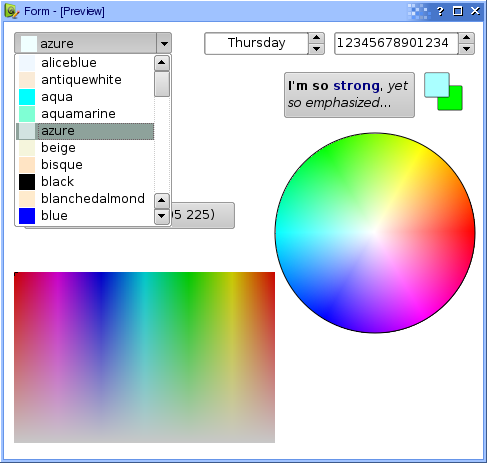
    Ok, I finally forced myself and published the next, (almost) fully usable beta of wwWidgets.

    http://www.wysota.eu.org/wwwidgets

    All comments are of course welcome.

    Oh... and of course a screenshot of some of the widgets.


  12. #11
    Join Date
    Nov 2006
    Location
    Shrewsbury, UK
    Posts
    97
    Qt products
    Qt4
    Platforms
    Windows
    Thanks
    3
    Thanked 11 Times in 11 Posts

    Default Re: wwWidgets

    Building on Windows, I get

    Qt Code:
    1. 1>.\qwwfilechooser\qwwfilechooser.cpp(79) : error C3083: '{ctor}': the symbol to the left of a '::' must be a type
    2. 1>.\qwwfilechooser\qwwfilechooser.cpp(228) : error C3083: '{ctor}': the symbol to the left of a '::' must be a type
    To copy to clipboard, switch view to plain text mode 

    Both lines look like
    Qt Code:
    1. int mar = style()->pixelMetric(QStyle::QStyle::PM_DefaultFrameWidth, &opt, this);
    To copy to clipboard, switch view to plain text mode 

    Removing redundant "QStyle" fixes compilation, but I've now got some linker errors that I'm trying to sort out.

    P

  13. #12
    Join Date
    Jan 2006
    Location
    Warsaw, Poland
    Posts
    33,376
    Qt products
    Qt3 Qt4 Qt5 Qt/Embedded
    Platforms
    Unix/X11 Windows Android Maemo/MeeGo
    Thanks
    4
    Thanked 5,019 Times in 4,795 Posts
    Wiki edits
    10

    Default Re: wwWidgets

    Hmm... you're right, I don't know how the doubled QStyle happened to be there. If you define WW_NO_FILECHOOSER in the project file, those problems should vanish - the widget is not ready yet anyway... What exact linker errors do you get?

  14. #13
    Join Date
    Feb 2008
    Posts
    157
    Qt products
    Qt4
    Platforms
    Unix/X11 Windows

    Default Re: wwWidgets

    Do you except feature requests?

    I require something which could be called doubleExponentialSpinBox. That should be a SpinBox that excepts double values but displays them as "1234.0234 e -123".
    The Buttons should then increase either the value or the exponential depending on the position of the cursor.
    I require this very often since I am a physicist and deal with high exponential values quite often. However it is not possible to display these in any standard spinbox.

    Matthias

  15. #14
    Join Date
    Jan 2006
    Location
    Warsaw, Poland
    Posts
    33,376
    Qt products
    Qt3 Qt4 Qt5 Qt/Embedded
    Platforms
    Unix/X11 Windows Android Maemo/MeeGo
    Thanks
    4
    Thanked 5,019 Times in 4,795 Posts
    Wiki edits
    10

    Default Re: wwWidgets

    Quote Originally Posted by pospiech View Post
    Do you except feature requests?
    Sure, why not.

    I require something which could be called doubleExponentialSpinBox. That should be a SpinBox that excepts double values but displays them as "1234.0234 e -123".
    This can be done with the regular double spinbox by reimplementing two methods.

    The Buttons should then increase either the value or the exponential depending on the position of the cursor.
    Ah.. I see... seems nice, I'll look into it.

  16. #15
    Join Date
    Jul 2010
    Location
    Ahmedabad,Gujarat,India
    Posts
    25
    Qt products
    Qt3 Qt4 Qt/Embedded
    Platforms
    Windows
    Thanks
    14
    Thanked 1 Time in 1 Post

    Default Re: wwWidgets

    Hello,
    i need help! please reply my thread...

    I can install MinGw executable file in my Qt SDK... i got all the widget by wwWidgets in Qt Designer....
    But i can't find any Single wwWidgets in Qt Creator......
    Please tell me i need that Plugins in QtCreator tell me all that Steps...

  17. #16
    Join Date
    Jun 2010
    Location
    Salatiga, Indonesia
    Posts
    160
    Qt products
    Qt4
    Platforms
    Unix/X11 Windows
    Thanks
    11
    Thanked 32 Times in 29 Posts
    Wiki edits
    1

    Default Re: wwWidgets

    QtCreator provided by Nokia is built using MS Visual Studio, and i assume you built wwWidgets using GCC(mingw), so it is not compatible. If you want to be able to use wwWidgets in QtCreator, you must download QtCreator source code, then buid it, and run your new QtCreator.

  18. #17
    Join Date
    Nov 2010
    Posts
    31
    Qt products
    Qt4
    Platforms
    Windows
    Thanks
    3

    Default Re: wwWidgets

    I'm use QtCreator to build wwWidgets but have an error:
    corrupted or invalid file QtGuid44.dll
    help me please

  19. #18
    Join Date
    Jan 2006
    Location
    Warsaw, Poland
    Posts
    33,376
    Qt products
    Qt3 Qt4 Qt5 Qt/Embedded
    Platforms
    Unix/X11 Windows Android Maemo/MeeGo
    Thanks
    4
    Thanked 5,019 Times in 4,795 Posts
    Wiki edits
    10

    Default Re: wwWidgets

    Quote Originally Posted by banlinhtienphong View Post
    I'm use QtCreator to build wwWidgets but have an error:
    corrupted or invalid file QtGuid44.dll
    help me please
    I don't think this is related to wwWidgets in any way.
    Your biological and technological distinctiveness will be added to our own. Resistance is futile.

    Please ask Qt related questions on the forum and not using private messages or visitor messages.


Similar Threads

  1. wwWidgets
    By mickey in forum Qt Programming
    Replies: 22
    Last Post: 17th July 2006, 15:20

Bookmarks

Posting Permissions

  • You may not post new threads
  • You may not post replies
  • You may not post attachments
  • You may not edit your posts
  •  
Qt is a trademark of The Qt Company.